When you add a photo to Nemi Gallery, the heavy work happens before anything uploads. Your browser decodes the photo, scales it to your workspace plan's size limit, and encodes it as AVIF. When your browser supports AVIF encoding, only that finished file is uploaded, and the original stays on your phone or laptop.
That's an unusual way to build a photo library, and it comes with one clear rule we want to state up front: Nemi doesn't keep your original files. It keeps a smaller, high-quality copy. Here's why we built it this way, what it saves, and how the copy looks next to the original.
Why encode on my device and not on your server?
Because photo libraries mean tens of thousands of pictures arriving at once, and encoding AVIF is slow work. When we benchmarked our server encoder settings, a single photo took from about 0.13 seconds for a small one up to 1.6 seconds for a large one. Multiply that by a hundred thousand photos and one import ties up a CPU for hours or days while everyone else waits in line.
Meanwhile, your own device has multiple CPU cores sitting idle while waiting on the network. Encoding on-device spreads the work across every user importing photos, runs in the background without freezing the tab, and sends only compressed bytes over your connection. Across the six photos we measured on the Pro plan, the stored copies total 27% of the originals: 6.1 MB instead of 23 MB. The upload finishes faster than a server queue could even start.
What happens when you add a photo
1/5The metadata is read from the original
If my device does the work, what stops it lying?
We don't trust anything the browser claims about the file. A modified client could easily upload full-resolution photos on a Free account and claim they're 1024 pixels.
Once the file lands in storage, Nemi reads its header directly to verify that it's really AVIF and fits within the plan's resolution cap. Anything else is rejected. The byte count that goes toward your quota comes straight from storage, never from the upload form. Your device does the work; our server verifies the result.
What if my browser can't encode AVIF?
Then our server handles it as a fallback, intentionally in a slower lane. Two cases trigger it: browsers that can't encode AVIF (Chromium browsers like Chrome and Edge can, while others hand the job off), and iPhone HEIC files, which most desktop browsers can't even open. Nemi detects either case automatically and uploads the original instead. That original arrives with all its metadata, including location; the server strips the location if your setting is on and discards the original.
On the server, the photo waits for one of two encoding slots, converts at the same quality and size limit, and the original is deleted immediately afterwards. It's never kept. Our privacy policy makes the same promise, and the iPhone app works the same way: it converts on the phone when it can, and uploads the original only when it can't.
How much smaller is the photo Nemi keeps?
A lot smaller, and how much depends on the workspace owner's plan, since each plan stores photos up to a different resolution. Pick a plan below: each bar is one of six photos, grey is the original file added, and colour is what Gallery stores.
The photo you added, and what Gallery keeps
62x
smaller than the photo you added, median of six photos, on Free, which keeps 1,024 pixels on the longest edge.
Forest and lake from above
9.1 MB to 207 KB
Evening clouds
5.3 MB to 16 KB
Desert butte
2.6 MB to 79 KB
Lighthouse at dusk
4.4 MB to 21 KB
Temple columns
1.2 MB to 50 KB
Horizon after sunset
365 KB to 4.5 KB
- The photo you addedWhat Gallery keeps
How much of that is AVIF itself?
To separate the format from the resolution cap, we measured all three formats at the exact same pixel dimensions instead of quoting someone else's chart. We scaled six photographs (landscapes, architecture, and sky) to each plan's limit and encoded them as lossless PNG, JPEG at quality 90, and AVIF at Nemi's settings. Across every photo and size, AVIF was 1.5 to 18.8 times smaller than JPEG, with a median of 3.9 times.
Median file size per photo, by plan
Free
longest edge 1,024 px
Starter
longest edge 2,048 px
Creator
longest edge 3,072 px
Pro
longest edge 4,096 px
Max and Business
capture resolution
How we measuredHide the method
Measured on 2026-10-03 on an Apple M2, 8 cores, with sharp 0.34.5, libvips 8.17.3, libaom 3.13.1. Each photo was rotated upright and resized to fit the plan's longest edge (never enlarged), then encoded once per format from the same uncompressed pixels. AVIF used quality 58 at effort 1, exactly the settings of Nemi's server fallback. Your browser's encoder uses the same quality but its own speed setting, so its files can come out slightly different.
The photographs are Unsplash originals. Sizes are deterministic, so one run each. The harness is scripts/blog-bench/gallery-avif/bench.ts.
3.9x
smaller than JPEG at quality 90, median of all sizes
501 KB
median photo at the Pro plan's 4096 pixels
6.9 KB
median grid thumbnail, the file you scroll past
What do I lose?
Mostly detail you have to zoom in to find. Drag the divider below: the left side is the uncompressed photo at the plan's size, and the right side is what the stored AVIF decodes to, pixel for pixel.
The same pixels, before and after
Pro plan, a crop from the photo stored at 4096 by 3067
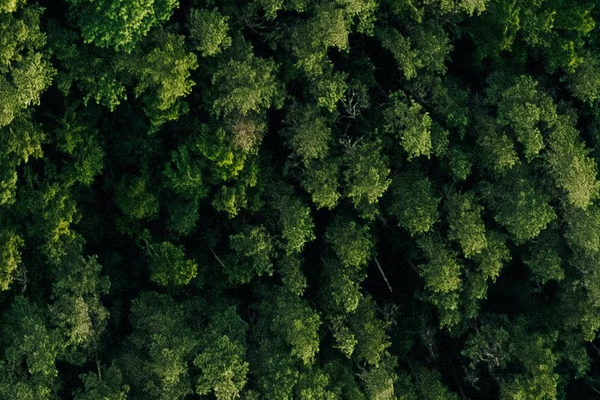 UncompressedWhat Nemi stores
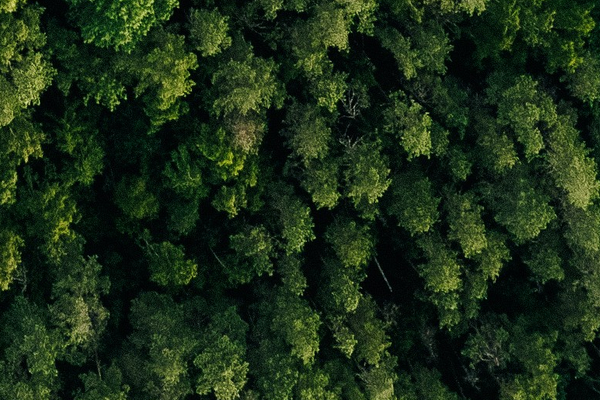
- As PNG, lossless
- 31 MB
- As JPEG, quality 90
- 5.8 MB
- As Nemi stores it
- 3.6 MB
Whole photo at this size. Photograph by Kristaps Ungurs on Unsplash.
Look at the clouds and you'll see what AVIF drops first: grain. Fine camera sensor noise smooths into flatter colour, because noise is the hardest thing to compress and the least meaningful. Edges, texture, and colour hold up.
We also measured fidelity using SSIM, where 1 means identical. Nemi's AVIFs scored between 0.924 and 0.996, while JPEGs at quality 90 scored between 0.901 and 0.999, beating AVIF in 20 of 30 cases. That's the honest tradeoff: AVIF is several times smaller and slightly less faithful. For viewing photos on screens, it's a tradeoff we'd make every time. For printing or heavy editing, it isn't, which brings us to originals.
Why Nemi doesn't keep the original
Keeping only the encoded copy is what makes a library of tens of thousands of photos affordable to keep forever on every plan, including Free, where photos never expire. The catch is that the size is decided once at upload and can't be undone.
Gallery keeps a very good copy of every photo, never the original. That's the product, not a shortcut.
- Upgrading later doesn't restore detail. A photo added on Free stays at 1024 pixels. A higher plan only applies to photos you add afterwards.
- Downgrading never shrinks existing photos. Anything already in your library stays untouched.
- It's not a master archive. If you shoot RAW, print large, or edit heavily, keep your originals somewhere built for originals, and never in only one place.
| Plan | Longest edge stored | Photos |
|---|---|---|
| Free | 1,024 px | 2,000 |
| Starter | 2,048 px | 25,000 |
| Creator | 3,072 px | 75,000 |
| Pro | 4,096 px | 250,000 |
| Max | Capture resolution, up to 16,384 px | 500,000 |
| Business | Capture resolution, up to 16,384 px | 1,000,000 |
Even on Max and Business, which preserve your camera's capture resolution, photos are still re-encoded as AVIF. Full resolution means keeping every pixel, not the original file.
What happens to the date, the camera and the location?
Re-encoding strips everything a camera writes into a file. Before encoding, Nemi reads that metadata from the original on your device and saves it alongside the photo: capture date, camera, lens, shutter speed, aperture, ISO, focal length, and GPS location if present. Without that step, a decade of trips would sort itself under the afternoon you uploaded it.
You can see every limit on the photo limits help page, and explore the rest of Gallery on its product page. If you want to convert files manually rather than store them, see what the converter supports and our converter benchmarks for how AVIF and WebP perform there.
Questions people ask
Is AVIF better than JPEG?
For keeping photos small, yes. In our measurements at the same pixel size, AVIF files were a median 3.9 times smaller than JPEG at quality 90. JPEG matched the original slightly more closely in 20 of our 30 comparisons, and more older software opens JPEG, so AVIF is better for viewing on screens than for print or heavy editing.
Does Nemi keep my original photos?
No. Nemi Gallery keeps a re-encoded AVIF copy at the size the workspace owner's plan allows, never the original file. When your browser can encode AVIF, the original never leaves your device. When it can't, the original is uploaded, converted on our server, and discarded right away. Keep your originals somewhere built for them.
How much smaller are photos in Nemi Gallery?
It depends on the workspace owner's plan, since each plan sets its own maximum resolution. On Free (1024 pixels on the longest edge), the median photo in our test was 62 times smaller than the file added. Higher plans keep more pixels and save less, while the AVIF format alone accounts for about 3.9 times.
Can I upload iPhone HEIC photos to Nemi Gallery?
Yes. Most desktop browsers can't open HEIC, so Nemi detects that and sends the original to our server instead. The server converts it to AVIF at the same quality and size limit, then discards the original. The iPhone app converts on the phone when it can.
Does converting a photo to AVIF remove its date and location?
Re-encoding strips camera metadata from the file, so Nemi reads it first and stores the capture time, camera, lens, exposure, and location alongside the photo. If you turn on Remove location from new photos in Gallery settings, coordinates are dropped before saving, and on your device whenever your browser handles the encoding.
What resolution does Nemi Gallery keep?
Free keeps the longest edge at 1024 pixels, Starter at 2048, Creator at 3072, and Pro at 4096. Max and Business keep the camera's capture resolution up to 16,384 pixels, still re-encoded as AVIF. The workspace owner's plan decides the limit, and upgrading later doesn't sharpen photos you already added.
Where the numbers come from
- The device encoder
lib/gallery/encode.ts (encodePhoto, planEncode) - The server fallback and its measured effort setting
lib/gallery/transcode.ts - The header check on what was uploaded
lib/gallery/avif.ts (probeAvif) - Metadata read before the re-encode
lib/gallery/exif.ts - Quality, thumbnail size and resolution caps
lib/gallery/plan.ts, lib/pricing-plans.ts (galleryMaxEdgePx, galleryMaxPhotos) - The benchmark harness and its results
scripts/blog-bench/gallery-avif/bench.ts, lib/blog/data/gallery-avif-on-device.json - What happens to originals/privacy